


Computer Restarts Itself
My PC running on Windows XP frequently restarts it self for no apparent reason. Any files or internet pages I have been working on are lost. The PC reboots to the desktop and I have to redo all my work. Any ideas please? |
Baby, It's Hot in There
Sometimes this can be caused by an overheating situation. Itunes, RealPlayer, Windows Media player, etc. require a lot of processing power to decompress and decode music files, which can cause the processor or hard drive to get hot.
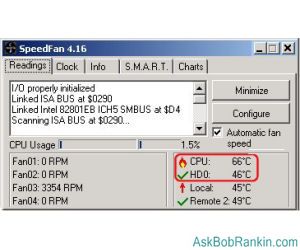
If your CPU is running at over 60 degrees (C) you might be at risk of burning it out. Some systems shut down automatically when the temperature reaches an unsafe level. Every few weeks I open my system unit and clean the fins on the heat sink that sits under the CPU. When they collect dust it restricts the airflow and prevents proper cooling. You can use a can of compressed air (look at your local office supply store) or an old toothbrush. I just did that on my system and the CPU temperature dropped by ten degrees!
Download the free Speedfan utility and it will tell you the temperature at which your CPU and hard drives are running.
Memory Fails Me...
 If you determine that overheating is not the problem, the most likely suspect is bad memory. Trying to access a bad spot in your system memory (RAM) can cause the computer to freak out and restart. The best way to find the culprit is to pop open the system unit, remove (or replace) one RAM stick and see if the problem is solved. Run your system for a while and if the problem goes away, you win! If not... lather, rinse and repeat for each RAM stick until you find the one that's misbehaving.
Don't Do Me Any Favors
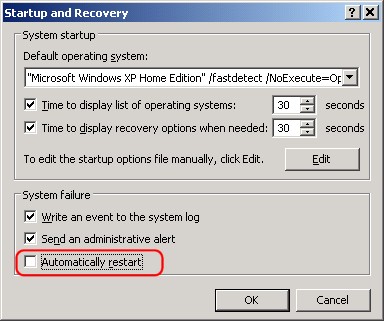 There's a setting buried in Windows XP that tells your computer to restart when a system error occurs. If you turn off that option, you may solve your automatic reboot problem.
Note that this may prevent the system from restarting, but it can also mask the true problem. As an alternative to this measure, consider what has recently changed on your system. If you have installed new hardware or software, remove it and see if the annoying restart persists. Sometimes downloading the latest driver software from the manufacturer's website will fix hardware incompatibility problems that cause restarts.
Computer Restarts After Download?
Some folks have written to me complaining that their computer automatically restarts itself after every download. And interestingly, most (if not all) mentioned they were using the Firefox browser. If you are using a download manager or download accelerator, this could be causing the problem. Check all the settings in the download manager and tweak if necessary. Or get rid of the download manager and see if the problem remains.
This can also be a virus or spyware problem. I suggest you go through your Control Panel / Add or Remove Programs list and remove any programs you don't need, then run thorough anti-virus and anti-spyware scans. It could even be your anti-virus program fighting with the browser or download manager. Switching to a new anti-virus might help also. See my recommendations for the best free anti-virus software for help with that.
Other Things to Consider
Failing or under-rated power supplies can also cause your computer to restart at seemingly random intervals. Switching out a power supply is really not too hard. Turn off the computer, open the case, disconnect the power cable from the power supply to the motherboard. Unscrew the power supply from the case, and reverse the process to install a new power supply. A 300-watt power supply will be fine in most computers.
And as one reader kindly pointed out, bad capacitors on the motherboard can also cause random reboots. But unless you're kinda geeky and handy with a soldering iron, it's tough to identify and fix this problem. You can find lots more helpful info on bad capacitors at badcaps.net. For most mere mortals, replacing the motherboard as a last resort will be easier than replacing a capacitor.
I also encourage you to read ALL of the comments below, before you rip your hair out, or rip your computer to shreds. It boils down to this... most restart problems are caused by overheating, bad ram, malware, or some other failing component. It can be difficult and time-consuming to identify WHICH of those things is the culprit. The only good solution is to test each one, in sequence (removing and replacing components if necessary), to identify the problem.
|
|
|


This article was posted by Bob Rankin on 21 Feb 2006
| For Fun: Buy Bob a Snickers. |
 |
Prev Article: Eat Your Cookies |

The Top Twenty |
Next Article: Fiddling While Your Hard Drive Crashes |
 |
There's more reader feedback... See all 235 comments for this article.
Post your Comments, Questions or Suggestions
|
Free Tech Support -- Ask Bob Rankin Subscribe to AskBobRankin Updates: Free Newsletter Copyright © 2005 - Bob Rankin - All Rights Reserved About Us Privacy Policy RSS/XML |
Article information: AskBobRankin -- Computer Restarts Itself (Posted: 21 Feb 2006)
Source: https://askbobrankin.com/computer_restarts_itself.html
Copyright © 2005 - Bob Rankin - All Rights Reserved

Most recent comments on "Computer Restarts Itself"
(See all 235 comments for this article.)Posted by:

Mike
27 Nov 2010
Hello, My computer restarts by itself here and there, sometimes it will go through a whole day with out a single restart. Sometimes every 2 minutes, What is wrong with my PC!
Posted by:

kuldeep
25 Dec 2010
hello, sir i have a windows xp newly installed. I am using net with connection of mobile.but when i'm download any file from net, its automatically restart. I have no antivirus .what can i do . Please help me.
Posted by:

regin out
26 Dec 2010
here is a good overview of this problem; http://ezinearticles.com/?Computer-Restarts-Automatically,-Solve-This-Problem-Here&id=5585712
Posted by:

ashwani barola
31 Dec 2010
this is such useful stuff.my pc is restart again and again but after reading this stuff i got lot of knowledge and follow the steps as you mentioned above and this problem is go away..really thanks
Posted by:

KARTHIK
31 Dec 2010
i have so big problem with my computer........it restart itself .......wat i needed to do also i dont now ....i now this problem no because temperature.....but it come from other way.....if some can help me pls call.......my no 058051197..................................pls help me .............pls.pls......pls..........pls...pls........
Posted by:

Sathish
12 Feb 2011
My system starts to reboot after when all the files copied while installing the Windows XP SP3/2 when it is about 90% and then it shows NTLDR is Missing if I did once more time to install the OS it again structs in between file copying. I even tried to install Windows 2000 Professional their also after formatting of the devices it starts to reboot the system. I've 1.25 GB of RAM in which both are working fine under my friends system which of same configuration. Please let know I'm not able to complete the OS Installation.
Posted by:

ash
16 Feb 2011
thanks man , i love u ,
Don't Do Me Any Favors,
when checked , automaticaly restart box was ticked
thx so much
Posted by:

dilip
17 Mar 2011
hi......my computer start
blue screen message error
and restart the computer
Posted by:

Deepak
18 Mar 2011
Hi, there is something wrong in my p.c. My p.c will restart again and again plz help me whats wrong in my p.c.
Posted by:

AL
28 Mar 2011
Hey thank you for this web page. i resolved this issue. Thanks AL
Posted by:

beth
27 May 2011
hello sir..my computer wont restart after i scan it...whenever i attemt to restart its shutdown...so my computer is very slow..so pls help me..thankz
Posted by:

Princess
08 Jun 2011
I also have problem , my pc is restarting automatecally when I changed the baterry , please help me on how to solve this problem.
Posted by:

Amir
02 Dec 2011
I wrote an assembly language program for Pentium III, and I used an incorrect, out of limit offset on purpose in the protected mode. I know that there is a GP exception and a triple fault but why CPU restarts and executes the whole code again?
Posted by:

The_Skycutter
24 Dec 2011
I have to say thank you to Bob! I recently did a major update to my Compaq computer by installing new hardware (Hard Drive, Power Supply, and Memory). After that my computer start randomly restarting, I had forgotten to uncheck the Automatically Restart in the System failure section. My computer works perfect now!!
The Cutter
Posted by:

Cathy Badajos
06 Feb 2012
same prob here. do you think it's a virus?
Posted by:

Emmadoju Vikram
13 Feb 2012
hey. hai.. hello..., there,
Yes it is true that computer will restart when it is over heated. I checked this my computer also restarts but only if we play games. I have a broken screw pillar on my CPU heatsink fan. I glued it Fevikwik. Before this my CPU Heat is recorded as 87'c when we play a game it goes very high and makes system failure. After gluing my CPU heat recorded as 45'c and my system become completely stable and works better. So I suggest you to check the CPU heatsink fans and graphic cards fan whether connected firmly to the aluminium heatsink. I think this will definetly help you to get she of this problem. Thank you. If this helps please leave comment starting with my name.
-@Emmadoju Vikram
Posted by:

Burhan
09 Jan 2013
You Can Try this for help
http://techhelp-pc.us
For Free Support call on :1-855-639-0999
Posted by:

lorrie
11 Jun 2013
TY, I had to uncheck the automatic restart button....:-)
Posted by:

VPN Service
05 Nov 2014
Online security is becoming very important for everybody. While browsing internet one's information and data is exposed to the prying eyes of spammers and hackers. Even anti-virus software attached to one's body can not do much when your info is sent out inside chaotic cyberspace where it can be prowled by hackers and useful for their nefarious ends. Even firewalls can only prevent such threats from entering the LAN so because of this data within your system remains safe. The best tool open to safeguard important computer data as it travels inside market is a Virtual Private Network.
Posted by:

Sierra
03 Mar 2016
my pc is gonna restart in 2 min plz help Im just 12 and I don't no how to reset I no I hve a lot of sprlling errors but Idk pls help me I don't wanna tell my parents because my mom will yell at me